Know the date you can go home for good.
WorldNgayon Money Planner helps you split your salary into needs, wants, your Uwi Fund, an emergency fund and investments, so you always know what to do on payday and how close you are to going home.
- Free to use
- No bank linking
- Any currency, live rates
- Try it without signing up
See it in one minute
How WorldNgayon Money Planner turns "uwi na next year" into a real date: split your salary, set your Uwi Fund, and watch your go-home date get closer every payday.
Want the full walkthrough? Watch the step-by-step guide.
Split your salary once. Everything else follows.
Enter your take-home pay and give every part a job. Start from a proven rule like 50/30/20, or build your own buckets. The pie always adds up to exactly 100%, so raising one bucket takes from another.
- Ready rules: 50/30/20, 60/20/20, 70/20/10, or the Uwi focus split
- Rename, add or remove buckets, with an optional tithes share
- One tap updates your goals, budget, investments, payday to-do and monthly check-in
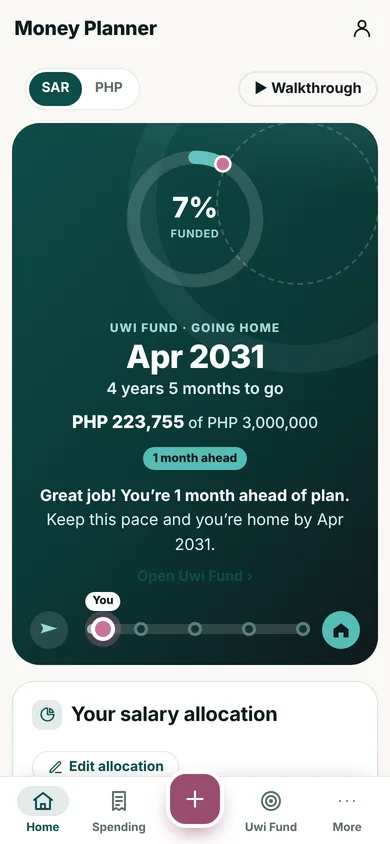
Your going-home date, on one screen
Pick the date you want to go home for good and list what "ready to go home" costs: a house, negosyo capital, tuition. The planner tells you what to save each month, and checks it against your salary split.
- "Your allocation gets you there on time", or exactly how much you are short and what to change
- Add more goals as lines in one Uwi Fund, so nothing competes for the same money
- A journey track with milestones, and a shareable card that shows the percentage, never the amounts
Your safety net comes first
Choose 3 or 6 months of your monthly needs. The planner shows how many months you have covered, and reminds you to fill it before you invest or trade.
- Months covered, money still to go, and the month you'll be fully funded
- "If my income stopped today": how long your money would last, and how cutting back or flying home changes it
- Once it's full, move that share to your Uwi Fund or investments
If your income stopped today, your money would last about 5 months.
Every expense counts against your plan
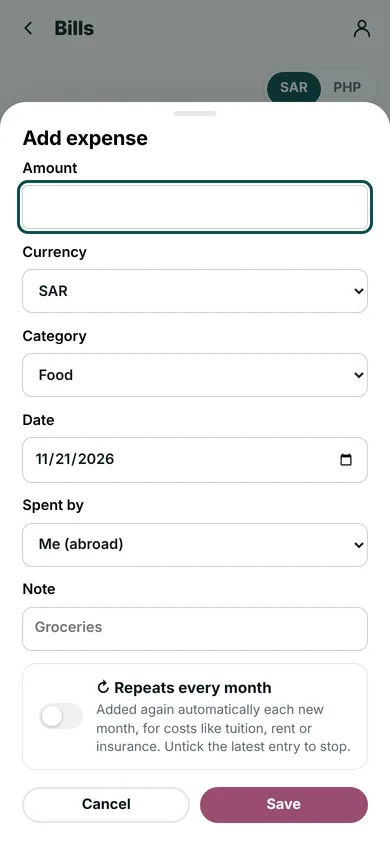
Add expenses in seconds with category chips, or type each category's total at month end. Each one lands in the right bucket, so you see Needs SAR 2,340 of SAR 4,000 at a glance, plus how much is safe to spend each day.
- Spent against allocation for every bucket, and a daily spending pace
- Bills tracker: overdue, due soon and paid, with an email reminder the day before
- Your planned monthly costs sit on the same page, checked against your Needs and Wants
SAR 1,860 left for 12 days, about SAR 155 a day.
A to-do list that tells you what to do first
On payday, open your to-do list. It ranks what protects your money first: overdue bills and contributions, then splitting your salary, then your goals. Confirm the monthly check-in, already filled in from your allocation, and your charts update.
- Split this month's salary, bucket by bucket
- SSS, PhilHealth, Pag-IBIG and MP2 due dates, so you never miss a contribution
- A two-minute check-in that keeps your goals honest, with plan-versus-actual for every bucket
Decide big purchases with your goals in view
Thinking of a new phone, a trip home or a big help for family? Type the cost and when you need it. The planner says whether your spare money covers it, and how far it would push your go-home date if you took it from your Uwi Fund.
- A clear yes, tight or not yet
- Turn it into a savings goal in one tap
- "Where should extra money go?" shows how much sooner each goal finishes with more saving
Built for life in two countries
Padala and rate alert
See what your family receives after fees, and get an email when the exchange rate hits your target.
Contributions
SSS, PhilHealth, Pag-IBIG and MP2 with due dates and reminders, so your benefits stay protected.
Yearly costs
Iqama renewal, tuition or a trip home: the planner sets aside a little each month so they never surprise you.
Investments with live prices
Track PSE stocks, funds, MP2 and crypto at market value, next to your monthly investment plan.
Trade log
Log forex, crypto and gold trades to see your win rate, profit and the habits that cost you money.
Loans and debt payoff
Schedules for bank and add-on loans, and the fastest way to be debt-free.
Net worth
What you own minus what you owe, counted automatically from your goals, holdings and loans.
Live currency conversion
Earn in one currency, plan in another. Past months keep the rate you actually received.
Family view
Share a private, read-only link so your family can see the plan and progress.
Contract and end-of-service
Your contract timeline, with an end-of-service benefit estimate added to your safety net.
Guided walkthrough
New here? A two-minute tour shows how every part works, and you can replay it any time.
Your colours, light or dark
Pick a colour theme such as Ocean Blue or Blossom Pink, choose your own colours, or switch to dark mode.
Payday reminders, bill nudges and a fingerprint lock
The Android app is the same planner, made for your phone. Sign in with the same email and your plan is already there.
- A reminder on payday to split your salary, and the day before every bill
- Lock it with your fingerprint, face or phone PIN
- Your going-home date on your home screen, and it opens even offline
How to use it, start to finish
From your first salary split to your payday routine, in one video.
Three steps, then a few minutes each payday
- Split your salary.Enter your take-home pay and give every part a job: needs, wants, Uwi Fund, emergency fund, investments.
- Set your Uwi Fund and safety net.Pick your go-home date and what it costs, then choose 3 or 6 months for your emergency fund.
- Follow your payday to-do.Pay what's due, split your salary, confirm the check-in, and watch your date move closer.
A short guided walkthrough shows you around the first time you sign in.
Start planning freeUwi Fund: how much to save each month
Pick when you'll go home for good. Amounts in pesos.
Good to know
What is WorldNgayon Money Planner?
WorldNgayon Money Planner is a free online budget app for OFWs and expatriates, made by WorldNgayon. You split your salary into buckets such as needs, wants, your Uwi Fund (going-home fund), an emergency fund and investments, then track spending, bills, padala, loans and contributions against that plan. It works in any browser and supports any currency.
Is it really free?
Yes. Every feature is free, with no trial and no card needed. Your salary and savings figures are never shared with advertisers, and you can download or delete your data at any time.
Is there a phone app?
Yes. The Android app is in early access on Google Play, and the iPhone app is coming soon. Get the app. It uses the same account, so your plan follows you.
Do I need to sign up?
No. You can use the whole planner as a guest; your plan stays in your browser. Create a free account with just your email to save your history and use it on any device.
Is it only for Filipinos?
No, everyone is welcome. It was built for Filipinos working abroad, but it works for anyone of any nationality who earns in one country and supports a home in another. Use any currency for your pay and your home, and simply skip the Filipino-only parts such as SSS, PhilHealth, Pag-IBIG and MP2.
What do "Uwi Fund" and "padala" mean?
"Uwi" is Filipino for going home: your Uwi Fund is the money you need to go home for good, whether that's the Philippines, India, Kenya or anywhere else. "Padala" is the money you send to family back home, also called a remittance.
Does it connect to my bank or GCash?
No. You enter your own figures, so no bank login or card details are ever asked for.
Are the exchange rates exact?
They are indicative daily mid-market rates. Remittance providers usually pay a little less, so you can enter the rate you actually received each month.
How should I split my salary?
Start from a common rule such as 50/30/20 (needs, wants, savings) and adjust it to your life. Many OFWs keep wants low and put more into their Uwi Fund. The planner tells you if your split reaches your going-home goal on time.
Can I include tithes or giving?
Yes. Turn on tithes and choose a share of your salary. The rest of your buckets adjust so the total still adds up to 100%.
Can I change the colours or use dark mode?
Yes. Under Appearance you can pick a colour theme, set your own colours, and switch between light, dark or your device's setting.
Is this financial advice?
No. The planner gives estimates from the figures and assumptions you enter. It does not recommend specific products or promise returns.
Your go-home date is waiting.
Set up WorldNgayon Money Planner in a few minutes, then watch the date move closer every payday.
Start WorldNgayon Money Planner free